
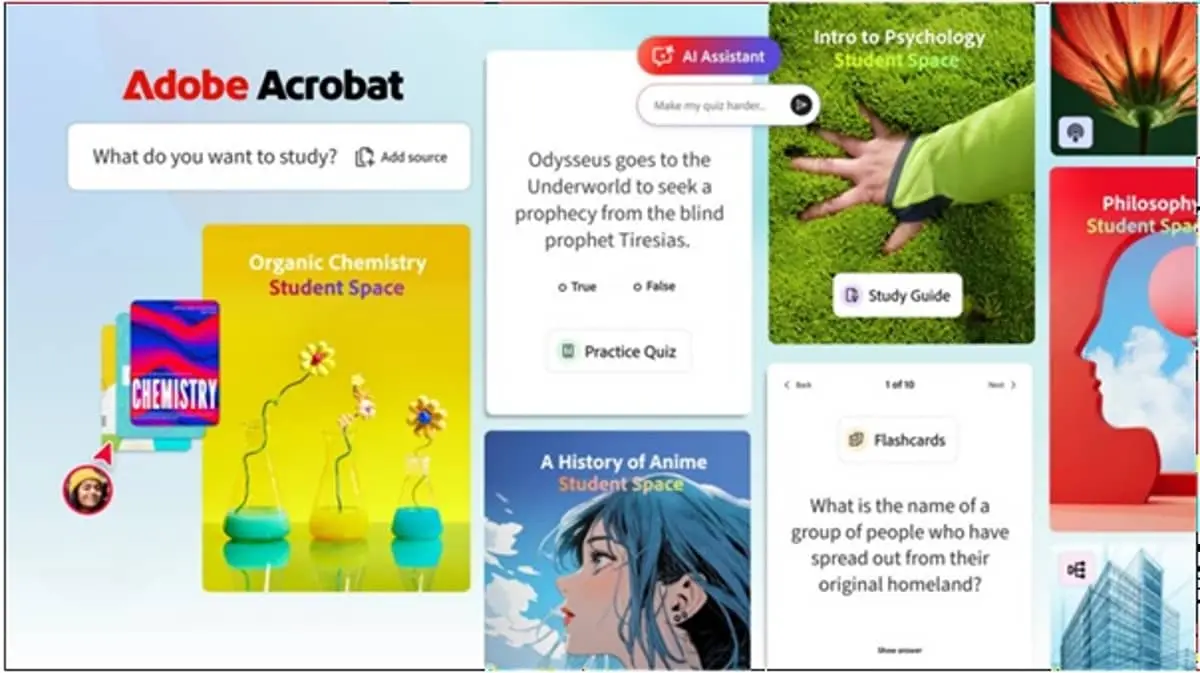
Adobe has introduced a new feature called Student Spaces within its Acrobat platform, aiming to redefine how learners interact with digital documents. Designed for students and educators, the feature integrates AI-powered tutoring, automated quizzes, and interactive study tools directly into PDFs—turning static files into dynamic learning environments.
The move reflects Adobe’s broader push into AI-driven productivity and education technology, as competition intensifies among tech giants to embed generative AI into everyday workflows.
Turning PDFs into Interactive Learning Hubs
At its core, Student Spaces transforms traditional PDFs into collaborative, AI-enhanced study zones. Instead of passively reading documents, students can now:
- Ask contextual questions to an AI tutor embedded in the document
- Generate summaries of complex topics
- Create flashcards and quizzes based on the content
- Highlight and annotate with intelligent suggestions
Adobe’s AI engine analyzes document context to deliver real-time explanations and guided learning, making it particularly useful for dense academic materials like research papers, textbooks, and lecture notes.
AI Tutor: Personalized Learning Inside Acrobat
One of the standout features is the AI tutor, which acts as an on-demand assistant. Unlike generic chatbots, this tutor is trained to work within the boundaries of the uploaded document, ensuring responses stay relevant and accurate.
Students can:
- Break down difficult concepts step-by-step
- Ask follow-up questions for clarity
- Receive simplified explanations tailored to their level
This approach reduces dependency on external tools and keeps the entire learning process centralized within Acrobat.
Automated Quizzes and Knowledge Checks
Student Spaces also introduces auto-generated quizzes, allowing learners to test their understanding instantly. The system can:
- Create multiple-choice or short-answer questions
- Adjust difficulty based on content complexity
- Provide instant feedback and explanations
For educators, this feature offers a quick way to build assessment-ready material without manual effort, saving time while maintaining consistency.
Collaboration and Classroom Integration
Adobe is positioning Student Spaces as more than just a solo learning tool. The feature supports collaborative workflows, enabling:
- Shared annotations among classmates
- Group discussions within documents
- Teacher-guided study sessions
This aligns with the growing demand for hybrid and remote learning solutions, where digital collaboration is essential.
Strategic Push into AI-Powered Education
The launch of Student Spaces comes amid a surge in AI adoption across edtech platforms. Companies like Google, Microsoft, and OpenAI have been rapidly integrating AI into learning ecosystems, from smart note-taking to personalized tutoring.
Adobe’s advantage lies in its dominance in document workflows. By embedding AI directly into Acrobat—already widely used in education and enterprises—the company lowers the barrier to adoption.
Industry analysts suggest that this could help Adobe capture a larger share of the student and academic market, especially as institutions look for integrated, secure, and scalable tools.
Privacy, Accuracy, and AI Limitations
While the feature promises enhanced productivity, Adobe emphasizes data privacy and controlled AI outputs. The AI tutor is designed to remain document-focused, reducing the risk of hallucinations or irrelevant responses.
However, experts note that:
- AI-generated summaries may still require human verification
- Over-reliance on automated quizzes could limit critical thinking
- Institutional adoption will depend on compliance with education data standards
What This Means for Students and Educators
Student Spaces signals a shift toward context-aware AI learning, where tools adapt to the material rather than forcing users to switch platforms.
For students, the key takeaway is efficiency and personalization—faster comprehension, targeted revision, and interactive engagement. For educators, it offers automation and scalability, especially in content-heavy courses.